 GAUGE Budget
Global Accounts, Universal Goals & Expenses
A budget planner in Excel, made for people living abroad
GAUGE Budget helps you plan and track your money when your life runs in more than one currency. Your pension or pay may arrive in one currency while rent, food and bills are paid in another. GAUGE Budget converts for you, so you never have to do the maths by hand.
It is an Excel file that lives on your own computer. There is no account to make and no password to remember.
What it does
- An easy-to-read budget you set up your way. Add, rename or remove budget lines and groups to match how you really live, with each bill in the currency you actually pay it in. One clear page shows what is planned, what is spent and what is left.
- Record what you spend, by cash, bank account or card, and see what is left to spend this month.
- Save toward goals with savings funds that fill up like a thermometer.
- Get reminders for bills that are due or paid late.
- Yellow cells show where you can type. Everything you use day to day is on one page.
- Look back over the year, month by month.
Your budget in your pocket
Most spreadsheet budgets only work when you are sitting at your computer. By the time you get home, the receipts are lost and the month is already over budget. GAUGE Budget Full puts a phone page in your pocket so you stay on budget while you are out spending.
- Check before you buy. See how much is left to spend this month, right on your phone, while you are still in the shop.
- Add it on the spot. Type what you spent, in any currency, in a few seconds. No more saving receipts for later.
- Just say it. Tap the microphone on your phone keyboard and speak, like "groceries 850". GAUGE Budget understands amounts said in words, so you can add spending hands-free while you walk out of the shop.
- It lands in your budget by itself. Your phone entries are added to GAUGE Budget the next time you open it on your computer.
- Your own Google account, no extra app. The phone page uses the free Google Sheets app on Android (iPhone coming soon) and lives in your own Google Drive. Nothing passes through us, and there is no monthly fee.
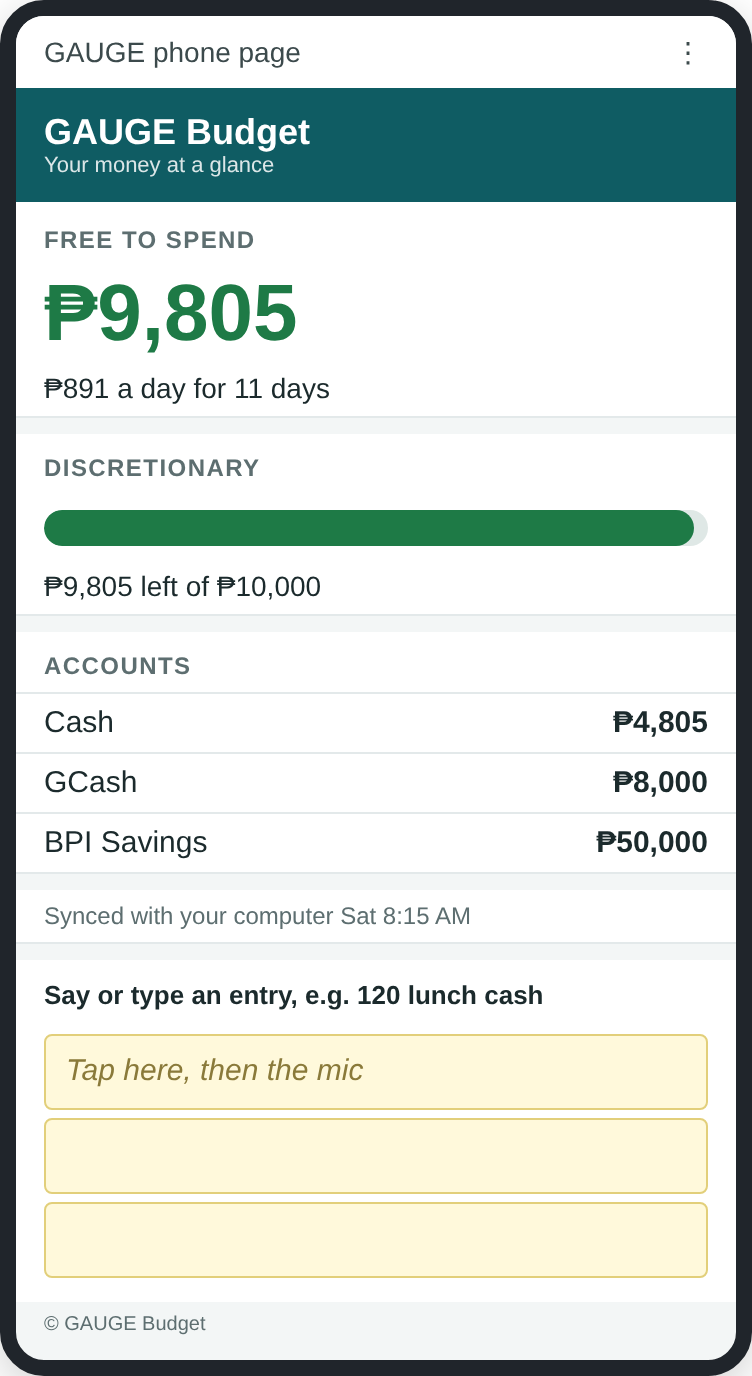
Set-up is one button: click Connect my phone in GAUGE Budget, sign in to Google, and scan the code with your phone.
Easy setup: about 30 minutes, once
Have your bank balances and your list of monthly bills in front of you. Then fill in the yellow cells on one Settings page. A step-by-step Setup Guide inside GAUGE Budget walks you through it in plain words.
- Your currencies (about 2 minutes): the currency you spend in most, and any others you use.
- Your accounts and cards (about 5 to 10 minutes): names and starting balances.
- Your budget (about 15 to 20 minutes): your bills and spending lines, how much for each, and the currency you pay it in.
- Your phone (about 2 minutes, Full edition): click Connect my phone and scan the code.
After that, a few minutes a week keeps it up to date. Not sure yet? Look through the free view-only preview first: it is a filled-in example, so you can see how everything works before you buy.
What you need
GAUGE Budget is an Excel file. Here is what you need for each edition that we do not provide.
Free preview
- Microsoft Excel on a Windows computer: Excel 2019, 2021, 2024 or Microsoft 365. Older versions such as Excel 2016 are missing some functions GAUGE Budget uses. Get Excel from Microsoft
- Nothing else. It is a view-only example that is already filled in, so there is nothing to type.
Not tested yet: Excel on a Mac and Excel for the web.
GAUGE Budget Light
- Microsoft Excel on a Windows computer: Excel 2019, 2021, 2024 or Microsoft 365. Older versions such as Excel 2016 are missing some functions GAUGE Budget uses. Get Excel from Microsoft
- Your exchange rates: you type the rate when it changes, from your bank, money changer or a rates website. GAUGE Budget does the converting from there.
Also works in free Excel for the web (with a free Microsoft account), though desktop Excel is a little better: on the web you click a cell to see a short version of its note instead of pointing at it. Free Excel for the web
Not tested yet: Excel on a Mac.
GAUGE Budget Full
- Microsoft Excel on a Windows computer: Excel 2019, 2021, 2024 or Microsoft 365. Older versions such as Excel 2016 are missing some functions GAUGE Budget uses. Get Excel from Microsoft
- Your exchange rates: you type the rate when it changes, from your bank, money changer or a rates website. GAUGE Budget does the converting from there.
- Macros turned on for the GAUGE Budget file. The first time you open it, Excel asks; the Setup Guide shows the clicks.
- For the phone page: a free Google account, the free Google Sheets app on an Android phone (iPhone support coming soon), and an internet connection when your computer and phone sync. Make a free Google account · Get Google Sheets on Google Play
Will not work on: Excel on a Mac, Excel for the web, or Excel on phones and tablets. The buttons need Excel on Windows.
Choose your edition
Free preview
A view-only copy filled with example data. Look around every page, click any cell to read its note, and try the links. To use GAUGE Budget with your own money, buy Light or Full.
GAUGE Budget Light
The complete budget and spending planner with multi-currency support. No macros, so it also works in free Excel for the web.
GAUGE Budget Full
Everything in Light, plus buttons that do the work for you: automatic backups, easy updates, month-end help, and the phone page that lets you check and add spending from anywhere.
Where to get it
Our shop is opening soon. Check back here for the link.
Your data stays yours
Your budget lives in your own Excel file on your own computer. If you use the phone page in the Full edition, GAUGE Budget signs in to your own Google account and keeps the phone page in your own Google Drive. Your budget information is never sent to us. Read our Privacy Policy to learn more.
Contact us
Email us at support@gaugebudget.app. We usually reply within two working days.